
Government websites have traditionally been designed around navigation. Visitors use menu systems, search boxes, and links to find and browse content. Chatbots made the experience more conversational, but frequently, are just an alternative way to find content. Agentic solutions, called AI agents, on the other hand, help users accomplish goals and tasks.
With an agent architecture you can define multiple agents, each an expert in a particular domain. For example, a visitor might ask, “I need to renew my fishing license and find out when trout season begins.” An orchestrator agent can route the request to specialized licensing and regulations agents, retrieve information from trusted sources, and return one coordinated response. This marks a shift from websites that simply publish information to intelligent digital services that understand user intent and help people accomplish meaningful tasks.
In this article, we’ll look at how Drupal’s AI and AI Agents modules can power the shift to agentic architecture by complementing existing navigation based websites. We’ll also look at why Drupal is an ideal platform for enterprise agentic experiences that are grounded in your organization’s structured content, APIs, and workflows.
Why agentic experiences are the next step
Traditional websites require users to navigate menus, search results, PDFs, and forms, and terminology that may reflect the structure of the organization rather than the needs of the visitor.
Agentic experiences offer a different model – instead of requiring users to determine where information lives, the agentic approach powers modern conversational interfaces that allow users to simply describe what they need:
“When does deer season start in my county?”
“Which court form do I need for a small claims case?”
“What jobs match my background in IT and project management?”
AI Lab update on the benefits, risks, and emergent guidelines for LLMs in the public sector
Large Language Model Applications for Government
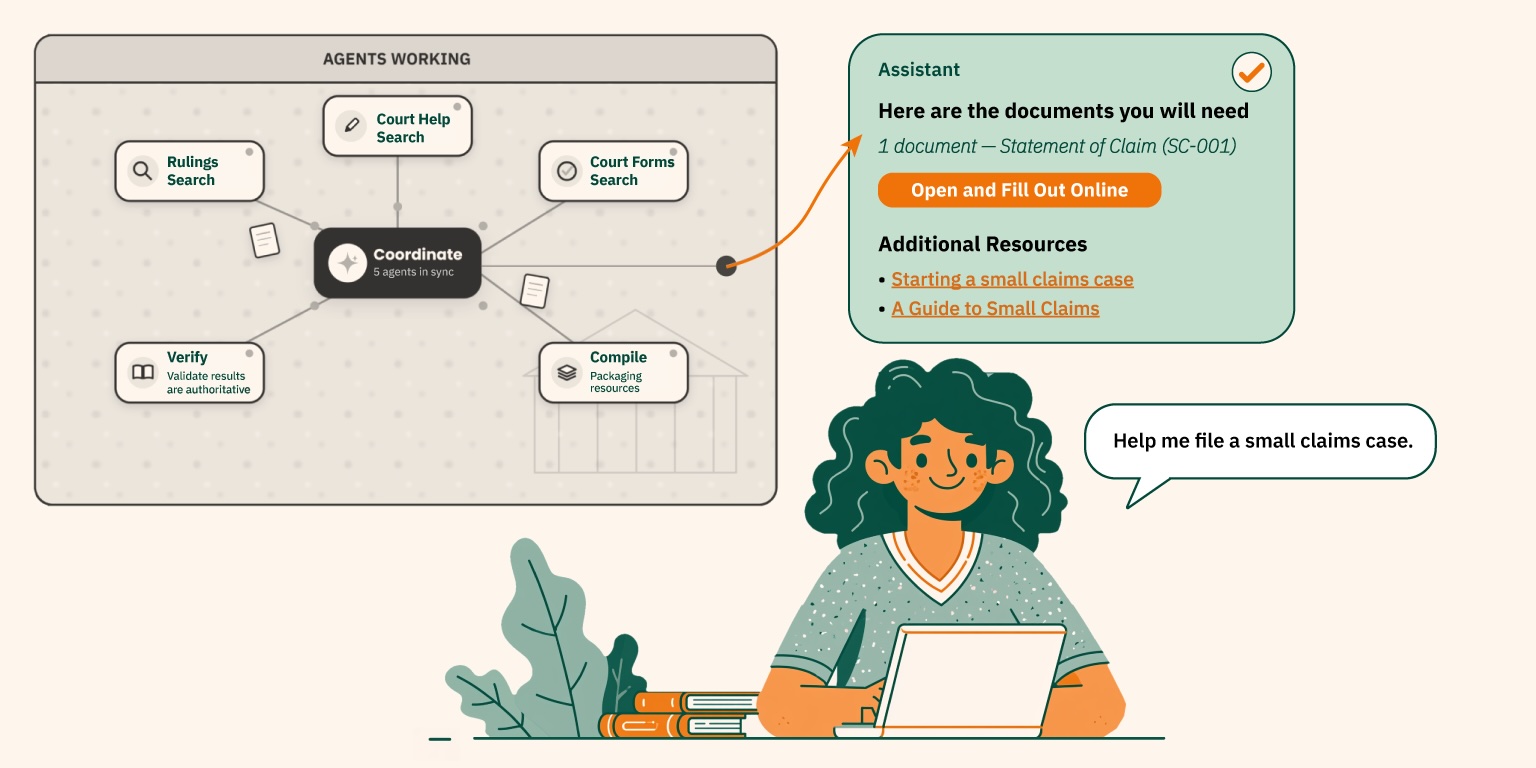
AI agents can interpret the user’s intent, retrieve information, perform searches, interact with internal and external systems, and return a direct, contextual response. Additionally, agents can move beyond answering individual questions to helping users accomplish multi-step tasks.
For example, a court assistant might leverage agents that identify the appropriate form, explain the filing requirements, provide the filing fee, and direct the user to the correct submission process. (See image above.) A licensing assistant could utilize agents to verify eligibility, retrieve current regulations, and guide the user to the appropriate application.
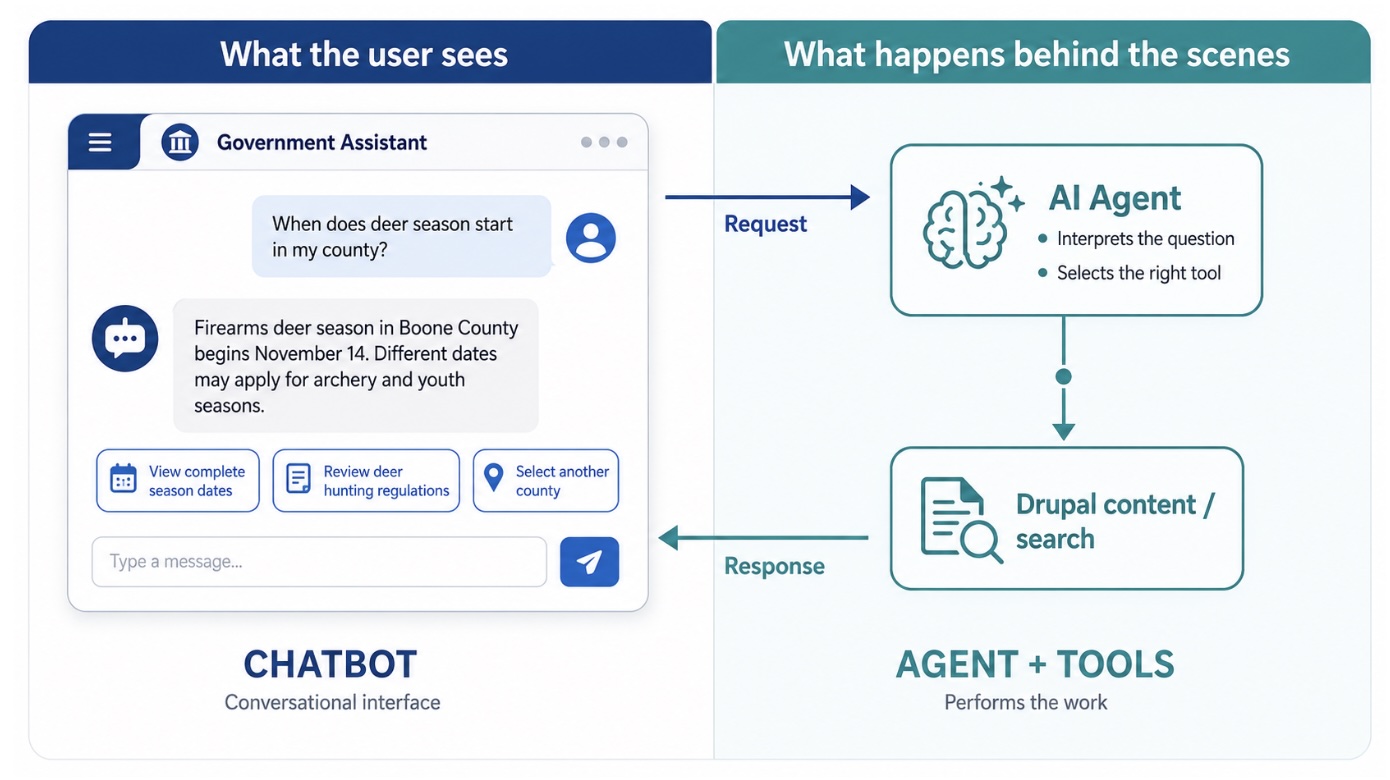
This is a key difference between an informational chatbot and an agentic experience: the chatbot provides the conversational interface, while agents perform the specialized work required to fulfill the user’s request.
Users no longer need to understand how an organization divides its content, departments, and digital services. The agent layer can coordinate and compile those resources on demand.
This shifts government websites from being information repositories that users must navigate into intelligent assistants helping people find answers, make decisions, and accomplish tasks.
More differences between chatbots and AI agents
The terms chatbot and agent are sometimes used interchangeably, but within the Drupal AI ecosystem they describe distinct layers of the application.
Chatbots provide the conversational interface
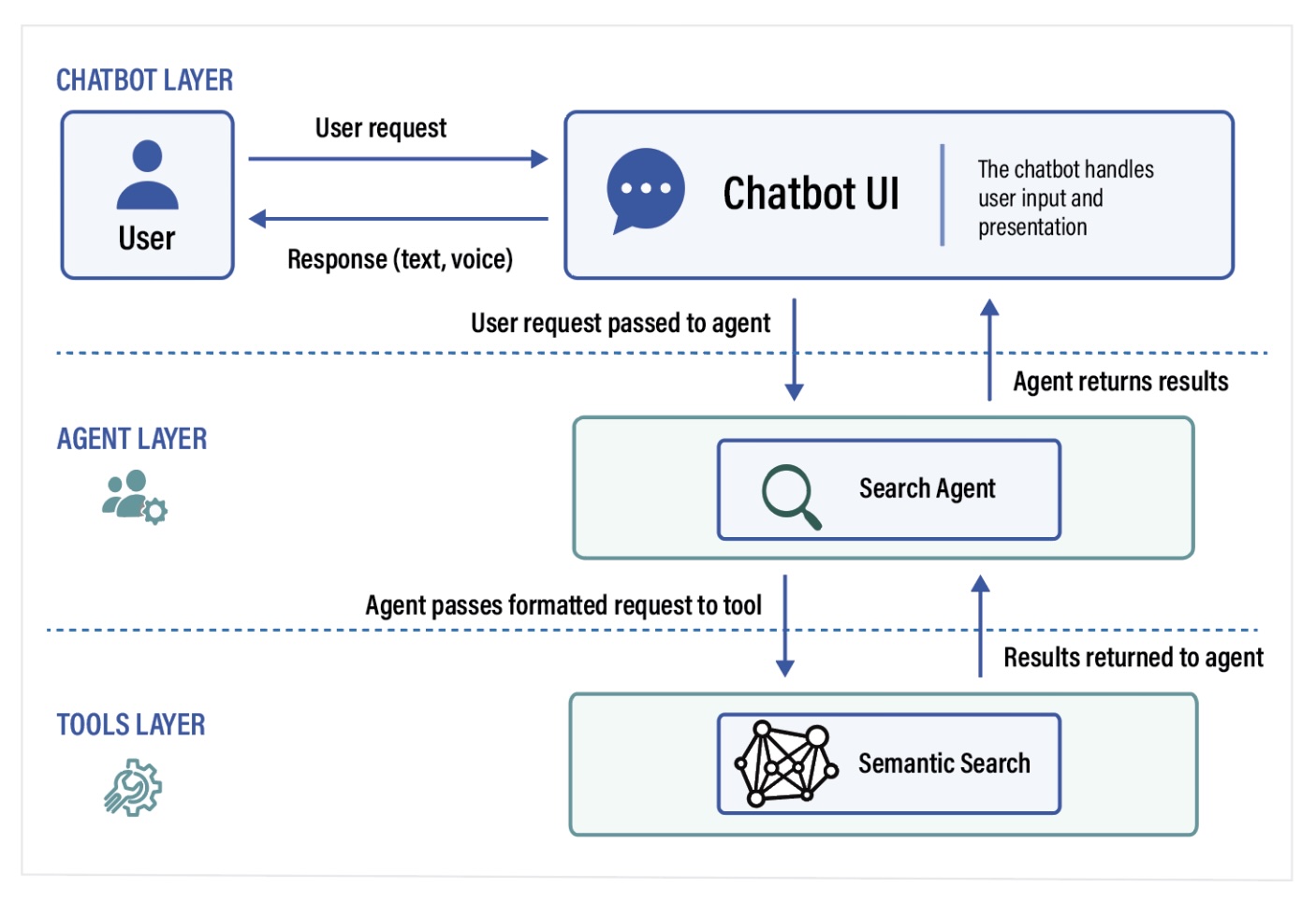
In Drupal, a chatbot is the user-facing interaction layer. It displays the ongoing conversation – accepts the user’s questions, and presents the resulting answers, links, forms, or other structured responses.
The chatbot does not perform the underlying work itself. Instead, it passes the user’s request to an AI assistant, an AI agent, or directly to a tool such as Semantic Search.
AI agents perform specialized tasks
An agent is the task-performing layer. It uses an LLM to interpret the user’s request (passed from the chatbot), determines what actions are required, invokes the appropriate tools, and returns the results to the chatbot.
Depending on its task or purpose, an agent might use “Tools” to:
- Query Drupal content and entities.
- Perform traditional or semantic (similarity) search.
- Retrieve or create information through an internal or external API.
- Initiate a form, workflow, or other business process.
- Call custom Drupal services and functionality.
For example, a Hunting Regulations agent might search approved Drupal content for the regulations associated with a particular species, season, and location.
Separating the chatbot from the agents makes the architecture easier to maintain. The conversational interface can evolve independently, while the specialized agents can be reused, assigned permissions, and connected to the tools, content, and systems they need.
A chatbot may communicate with a single agent for a focused use case. For example, a FAQ assistant.
What this architecture looks like in Drupal:
Single-Purpose Drupal Chatbot and Agent Architecture
Orchestrating agents
A single agent may be sufficient for a focused assistant, such as a semantic search assistant or an FAQ chatbot. More complex requests, however, may span multiple topics, domains, or steps.
Agentic architectures can support more complex requirements and experiences by coordinating multiple specialized agents, each with its own responsibilities, tools, permissions, and sources of information.
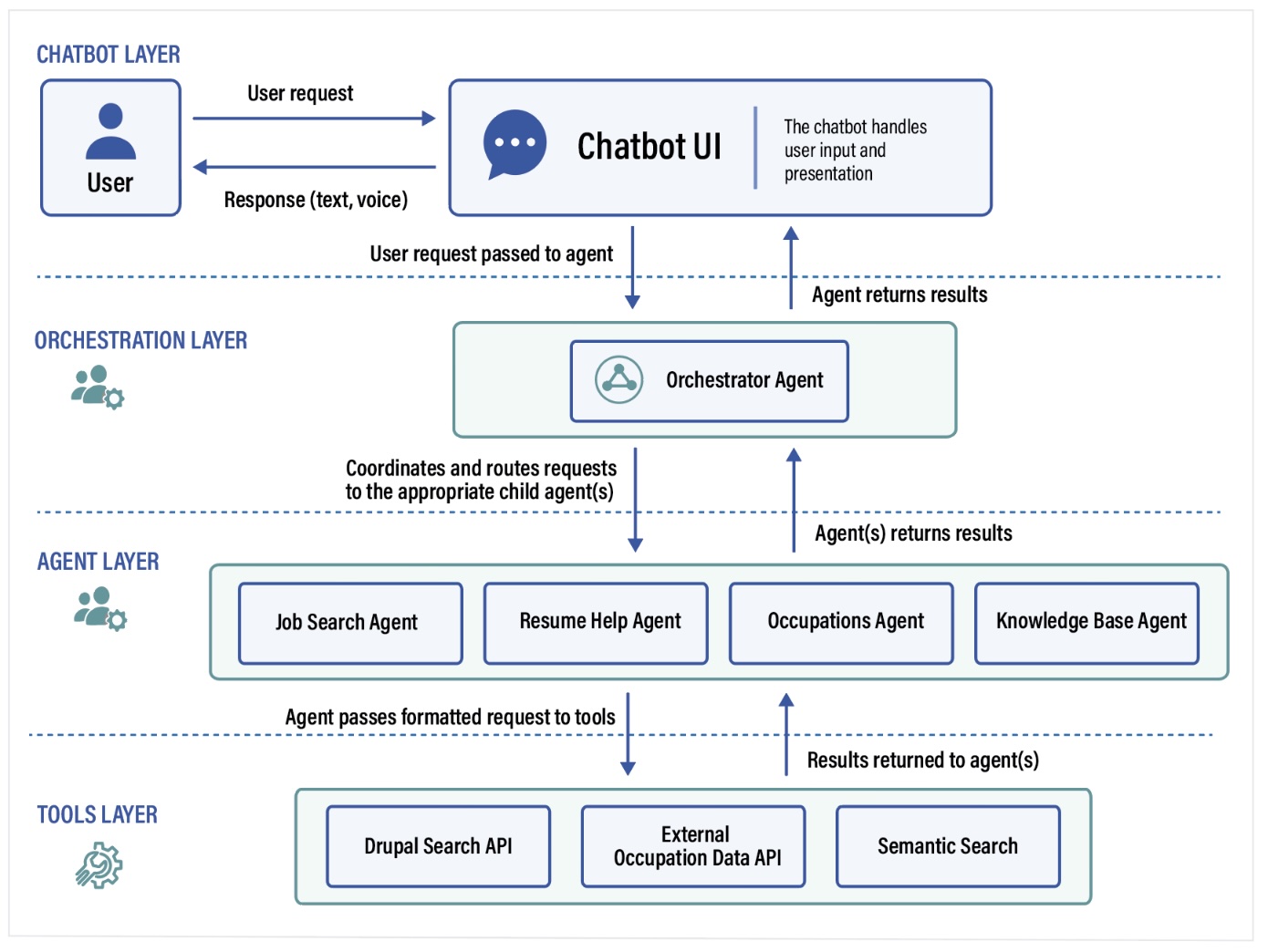
Within Drupal, an orchestrator agent can serve as the coordinating layer between the chatbot and one or more specialized agents. It interprets the user’s overall request and determines which agents are needed, delegates the appropriate work, and combines the results into a single, coherent response.
Side Note: These responses can be for human consumption or structured output to be used by APIs and external agents.
Depending on the request, the orchestrator agent may:
- Route a request to the agent best suited to handle it.
- Divide a multi-part request among several agents.
- Pass relevant information (context) and results between agents.
- Coordinate the results into a unified response for the chatbot.
The orchestrator agent does not need to contain all of the underlying domain knowledge itself. Instead, it just identifies the appropriate, available agent that can accomplish the given tasks.
Drupal Chatbot, Orchestration, and Multi-Agent Architecture
Example of an agent workflow
User: (at computer or mobile, screen based or voice)
“I need to renew my fishing license and want to know when trout season starts.”
Orchestrator Agent:
- Identifies that the request contains two related but distinct needs (users often ask multiple questions at once).
- Sends the licence-renewal portion of the request to the Licensing Agent.
- Sends the seasonal-regulations portion to the Seasons Agent.
- Receives the renewal requirements, application link, and applicable trout-season dates.
- Combines the results into one coordinated response (answers vs search results).
- Returns the completed response to the chatbot for presentation to the user.
From the user’s perspective, this remains a single conversation with the assistant. Behind the scenes, the orchestrator coordinates the specialized agents and systems needed to fulfill the request.
Fallback agents and human escalation
Not every request can-or-should be handled entirely by the chatbot or AI. A well-designed agent architecture includes a fallback agent that can gracefully respond when a request falls outside the system’s supported capabilities or requires assistance from an authorized staff member.
Within an orchestrated experience, the orchestrator can route a request to the fallback agent when:
- No specialized agent is appropriate for the request.
- The required information cannot be found in an approved source.
- The request requires human judgement, review, or authorization.
- The user appears frustrated or asks to speak with a person.
- The request involves a sensitive, urgent, or high-risk situation.
- The agent has low confidence on how to respond.
Depending on the use case, the fallback agent might:
- Ask a clarifying question.
- Direct the user to other trusted resources.
- Open a contact form.
- Create a support ticket.
- Initiate live chat.
When escalation occurs, the system can also pass along the conversation history and relevant details already provided by the user. This creates a smoother handoff and prevents the user from having to start over.
Fallback agents provide an important safety net, helping organizations define clear boundaries for automation while preserving access to knowledgeable human support.
Profile data and personalization
Existing user data can help agents provide more relevant assistants throughout the conversation.
When a user is signed in, an agent can use selected account and profile information to better understand the user’s circumstances. Depending on the service, this might include their location, communication preferences, existing licenses and applications, education and experience, or other types of information they provided through earlier interactions.
Personalization can reduce the need for users to repeat information and allow the assistant to provide more useful, personalized guidance.
For example, a career coach could tailor occupation recommendations to the user’s experience, education, and goals. A hunting/fishing regulation assistant could tailor information based on past requests, and location preferences.
Personalization should be intentional and limited to the information needed for the task. Organizations can control which agents have access to profile data, and should clearly communicate how that data will be used.
It is important to note that authentication and personalization are not required. The same chatbot can support anonymous visitors while providing additional, account specific assistance to authenticated users.
Conversational analytics
Conversational analytics provide a level of observability that is not available in traditional click-based analytics. You can view the full questions users are asking, what answers the chatbot (agents) are providing, as well as following the full thread of each conversation.
Traditional analytics tell you:
- What pages users visited.
- What links they clicked.
- Where they entered and exited the site.
Conversational analytics reveal:
- What users are actually trying to accomplish.
- Information they cannot find – content gaps (questions the organization’s content does not adequately answer).
- Terminology users rely on that differs from the organization’s own language.
- Misconceptions in what users are looking for and how.
- Requests that frequently result in fallback, escalation, or an incomplete response.
- Emerging trends – topics, services, and categories of content that are increasing over time.
- Where users abandon a conversation or fail to complete a task.
Organizations can also evaluate how the agentic system itself is performing: which agents are used most often, where additional agents or tools may be needed, and which responses require improvement.
Conversational analytics can inform updates to Drupal content, search indexes, agent instructions, and workflows, creating an ongoing feedback loop.
To address privacy concerns, conversational analytics can be completely anonymized or aggregated where appropriate.
Used effectively, conversational analytics become more than a reporting tool. They provide a continuous source of user research that can help organizations improve both their content and the services built around it.
Examples of agent-driven chatbots
Following are some examples of AI Chatbots that leverage the orchestration and multi-agent architecture discussed above.
Example 1: Regulations and Seasons Assistant
A hunting regulations assistant for a Department of Conservation might be comprised of the following agent architecture:
- Regulations agent: Can provide detailed information about hunting regulations for fish and wildlife.
- Seasons agent: Can provide information about hunting seasons for different species and methods.
- Fallback agent:
Example user queries:
- “When does deer hunting season start this year?”
- “When do spring turkey permits go on sale?”
- “What dates can I hunt with my crossbow?”
- “Can I use a drone to find my deer?”
- “How do I register my 12 yr old to hunt next to me?”
Example 2: Court Assistant
An assistant to help self-represented litigants find information in Court Help sections, find Court Forms, and more general help information, with a fallback to site search if the assistant can’t find relevant information.
- Court Help agent: Provides help finding information about the courts, attending court, and other related information.
- Court Forms agent: Helps users find relevant court forms.
- FAQs agent: Answers frequently asked questions. Can be part of a Fallback agent strategy.
- Search agent: Can search the site using semantic search.
Example user queries:
- “What if I can’t make it to jury duty?”
- “How do I file a small claims case?”
- “What happens if I miss my court date?”
- “I don’t have a lawyer. What are my options?”
- “Can I contest a traffic citation?”
- “I need to change my name. Which form should I file?”
- “Which form do I use to request a restraining order?”
- “How do I find legal aid in my area?”
Example 3: Career Coach
An assistant that acts as a career coach.
- Intake agent: Asks the user questions to clarify career requirements and gather information such as experience and education.
- o*net occupation data api agent: Provides integration with o*net data.
- Resume helper agent: Allow users to upload resumes and get feedback, recommendations, and identify skill gaps.
- Interview helper agent: Mock interviews
- Occupations agent: Searches for relevant occupations based on user provided information.
- Job Search agent: Perform searches against a job board based on user profile data including experience and goals.
- FAQ agent: Provide access to a knowledge-base of frequently asked questions.
- Fallback agent: Handle user queries that are outside the scope of the Career Coach and gracefully offer to hand them off to human support staff.
Example user queries:
- “How do I start my career?”
- “What skills and education do I need for a career in AI?”
- “How do I advance my career?”
- “What careers match my interests?”
- “What careers pay well without requiring a four-year degree?”
- “What career paths are available after military service?”
- “What jobs are suitable for someone returning to the workforce?”
Example 4: Staff Help Desk
A private chatbot for content creators and Drupal administrators.
- Content Type agent: Can answer questions about the types of content in the system.
- Component agent: Can answer questions about the available components such as cards, features, link groups, text, media, accordions, etc.
- Style Guide agent: Can provide answers about best practices for creating pages, selecting components, and brand guidelines.
Example user queries:
- “Which type of content should I use for notifying users about a regulation change?”
- What component should I use to display photos from our last event?
- What are the best practices for using the card component vs feature component?
Example 5: Content Governance Assistant
A private chatbot with the ability to ask about the state of various content.
- Content freshness agent: Determines whether content should be considered stale based on various criteria such as type of content, analytics, and user defined rules.
- Accessibility agent: Checks content for accessibility compliance.
- SEO agent: Checks content for SEO best practices.
- Brand compliance agent: Checks content for compliance to brand guidelines such as reading level, tone, component usage, and layout best practices.
Example user queries:
- “Which pages have not been updated in 3 years?”
- “Show pages with accessibility violations.”
- “Which content receives traffic but has high bounce rates?”
- “List all pages that have broken links.
Future-proofing with an agentic architecture in Drupal
The web is evolving from navigation-driven experiences toward conversational and agent-driven experiences.
Users increasingly expect to:
- Ask questions without having to understand how an organization structures its departments, content, and systems.
- Receive direct and contextually relevant answers.
- Complete tasks through conversation.
Organizations that already maintain content, workflows, and business processes in Drupal are well-positioned to take advantage of this shift. Drupal can provide the foundation, while specialized agents make that information and functionality available through conversational experiences.
An agentic architecture allows organizations to evolve incrementally. They might begin with a focused FAQ, search, or forms assistant and later introduce orchestration, additional domain agents, personalization, workflow integrations, analytics, and human escalation. Because the chatbot, agents, and tools remain separate layers, each can be refined or replaced as organizational needs and AI technologies change.
An agentic approach also makes it easier for organizations to implement pilot programs around specific use cases to test and assess the technologies, while increasing their internal knowledge and experience.
The same underlying architecture can support many different experiences, from public-facing licensing, career coaches, and court assistants to internal help desks and content governance tools. At the same time, it leverages existing Drupal content, APIs, permissions, and governance practices used for traditional websites.
By combining these capabilities, Drupal becomes more than a content management system. It becomes a flexible platform for intelligent digital services that help people find answers, make decisions, and accomplish tasks.
Contact us to schedule a free consultation to see if AI agents are a fit for your agency.
Learn more
- Find out more about using AI to optimize your organization’s digital goals
- Sign up for the AI Newsletter for a roundup of the latest AI-related articles and news delivered to your inbox
- Contact us about adding AI agents to your site