
When people picture Claude code going wrong, they usually picture something dramatic such as a deleted production table or a leaked secret. In practice, the failures I run into are quieter and easier to miss. It’s the coding equivalent of asking an AI assistant to edit a document: you watch it happen right in the chat, everything looks finished, and only later do you check the actual file and find it untouched, because the edit only landed in a temporary working copy, not the real thing.
In my experience, AI coding tools are only as good as the guardrails around them. By guardrails, I don’t mean in the abstract, “be careful” sense, but concrete, written-down, version-controlled guardrails that tell the AI what your team already knows.
A couple of weeks ago I gave a talk on this topic at Drupal Camp Asheville called “Guardrails, Not Guesswork.” I only got to cover the highlights, so I wanted a place to go deeper on what my day-to-day AI-assisted development process actually looks like, plus share some concrete references for review. This post is that: the fuller version of my talk, plus links to the deck and the repos I used to demo it. Everything below, from token mechanics to my actual PRD-to-shipped-feature workflow, is in service to this ideal of guardrails.
You can check out the original talk, find the demo repo at github.com/Ryankolsen/drupal-ai-demo, and the reusable skills I mention at github.com/Ryankolsen/drupal-guardrails-skills.
Why guardrails matter
Have you ever dealt with the following AI coding mistakes when using an LLM?
- AI writing logic into a Twig template instead of a preprocess hook because it didn’t know your conventions
- The context window has grown too large so answer quality degrades before anyone notices
- Security implications missed because the AI was never given the environment context to catch it
AI Lab update on the benefits, risks, and emergent guidelines for LLMs in the public sector
Large Language Model Applications for Government
None of these are catastrophic on their own, but all of them compound. Guardrails are what keep them from compounding: they’re the difference between AI-assisted development that’s faster and more consistent, instead of faster but slowly accumulating debt you won’t notice until later.
LLMs are stateless
Claude Code is, in effect, like a new developer joining your team every twenty minutes with zero institutional knowledge. Left to its own memory, it won’t reliably know what you built last session, your team’s naming conventions, that you use single directory components instead of block templates, or which contrib patches you’ve already applied.
That statement needs one caveat: Claude does keep some memory across conversations, so if you use it as a general assistant, this may not match what you’ve noticed. There are actually two memory folders behind the scenes, one global across all your projects, one local to whichever project you’re in, and Claude will occasionally save things there that it thinks are worth remembering. Claude Code has that same system, but what lands in those folders is hit or miss, more of a loose scratchpad than something you can count on to carry forward the details that actually matter.
So the fix isn’t to hope Claude’s own memory caught all of that, and it isn’t to explain it again every session either. It’s to write it down once, in a place the AI reads automatically every time: which is exactly what CLAUDE.md and skills are for, and I’ll get into both later.
The smart zone, and how to stay in it
Every model has an effective context window. For our purposes we can call it roughly 150K tokens before the model’s responses degrade. Since every turn re-sends the full history, the share of that window taken up by “stuff that’s already happened” climbs turn over turn even when you’re not adding much new information. By the fourth or fifth exchange in a long session, you can find yourself with only a quarter of your usable context left. See the checklist below for how to clear and manage the context window.
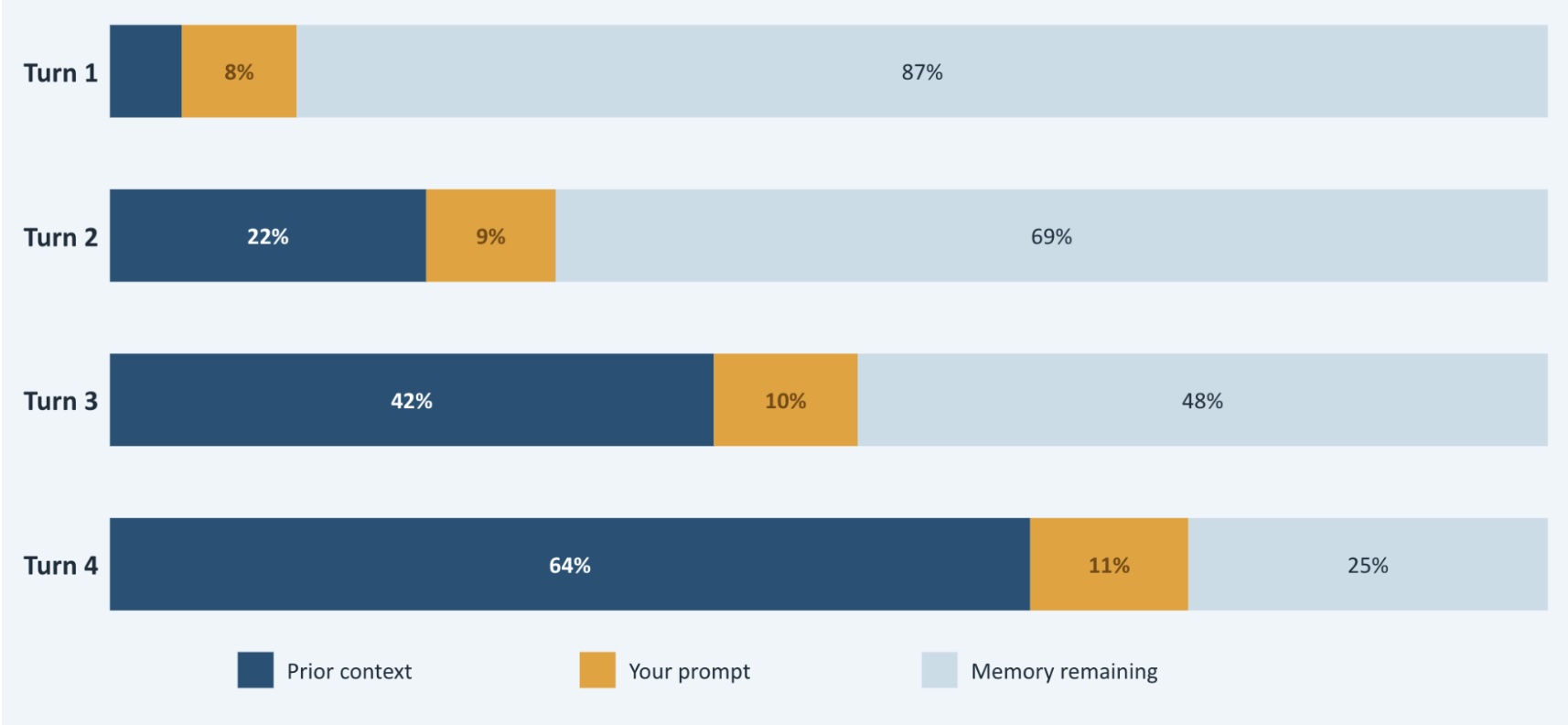
Models are noticeably better at attending to the beginning and end of a long context than the middle. Instructions you gave early in a session, or details buried in the middle of a long back-and-forth, are the first things to get fuzzy as the window fills up. Quality degrades quietly, before you notice it. I think of it as sliding from a “smart zone,” where the AI is sharp and reliable, into a “dumb zone,” where it’s technically still responding but starting to miss things.
What I do to stay in the smart zone:
- Watch context live. I run a custom status line script (~/.claude/statusline.sh) that shows my model, token usage, and running cost right in the prompt, so I can see context climbing in real time instead of guessing. The hourly and weekly limits are also displayed to make sure you don’t run over your limit unexpectedly.
- Clear chats proactively, not reactively. Rather than waiting until answers start feeling off, I use /clear as soon as I notice context climbing past a comfortable point — then re-orient the AI with a quick pointer to recent commits and which phase of work to pick back up on. More on what that looks like in practice below.
- Use a real handoff instead of compacting. When I’m ending a session because my context is too high, I use a /handoff step that writes out state, decisions, and next steps somewhere durable, rather than just shrinking the existing history. A written handoff survives a context reset; a compacted conversation is still guessing at what mattered. Once the /handoff skill is complete, I run /clear to start a fresh chat and refer to our handoff plan.
Engineering discipline matters more, not less
AI doesn’t replace engineering judgment. Instead, it amplifies whatever judgment (or lack of it) is already baked into your codebase. I think of it as a mirror effect. If we point Claude Code at a well-architected codebase with clean services, consistent naming, and real test coverage, and it produces code that matches that pattern. By contrast, if we point it at a tangled repository with logic scattered across Twig templates and no tests, it will reproduce and compound every bad habit it finds, just faster than a human would.
That’s the real reason the workflow below leans so hard on written plans and tests-first development. I find that lately I spend far more time in the planning phase than in the development or even testing phases.
How I work: PRD to shipped feature
This is the part of the talk I wanted more time to discuss. I use AI differently at work on Drupal projects than I do on my own side projects. At work I use a more human-in-the-loop process with more checkpoints. Here’s the process, end to end.
- Rename: The first thing I do in a brand new chat is run /rename. I name it with the ticket number, a short description, and the phase I’m in, something like “ABC-123 Adding a new API call, planning phase.” This way, when I’m jumping between a feature build and an unrelated bug fix, or picking something back up days later, I can actually find the right chat instead of scrolling and guessing.
- Create PRD: Next up is creating the PRD, Preliminary Requirements Document. I write it as a markdown file in my local project directory, generated with the /write-a-prd skill. What makes that skill genuinely useful isn’t just the document template, it’s that it asks me clarifying questions about the approach instead of quietly making decisions on its own. The back-and-forth is the value. By the end I have a PRD with real user stories and explicit implementation decisions, not just a restated feature request.
- PRD-to-Plan: From there, the /prd-to-plan skill converts that PRD into another local markdown file containing a structured implementation plan broken into tracer bullet, testable phases. Each step in the plan is explicitly tagged as either human-in-the-loop or safe to run autonomously. Reviewing ahead of time which steps need my eyes and which don’t is a guardrail in itself.The other piece that matters here is tracer bullets and test-first development. A tracer bullet is a thin slice through the whole system, for example, route to controller to service to template, built and tested end-to-end before anything gets fleshed out. Instead of building one full layer at a time, you get a single, real path working first, so you know the pieces actually connect. Each phase in the plan gets its own slice like this, with the test written before the implementation. When that test passes, it’s real evidence the slice works. Once our tests pass, we can expand into the full feature.I saw this play out recently on a real feature at work. A search filter needed a fallback autocomplete for when the usual context wasn’t available. Instead of building the whole thing in one pass (endpoint, lookup logic, styling, edge cases), I started with the smallest real path. A route, a controller that queries the right data, and a test that hits it end-to-end and checks the response. Once that thin slice passed, I knew the request actually reached the right code and returned the right shape of data, not just in theory, but proven. From there, each following piece was its own small, tested addition. A bit of test infrastructure cleanup, the front-end styling, and later a refinement to the matching logic that a test caught before it ever reached users. Nothing got built ahead of a passing test, and nothing got polished before the underlying path was confirmed to work.A nice side effect of working this way is that you end up with a real unit test suite without ever setting out to “write tests” as a separate task. That test suite is what lets you keep adding features at speed, because you have a way to know immediately if something you already shipped just broke.
- Check Context Window: At this point I check my context window. If it is below ~100K tokens I continue with Phase one. If not, I clear the chat and I ask the AI to execute only phase one and to stop after for testing. We use the /do-work skill that implements our plan while enforcing our team’s best practices along the way.
- Clear: When I notice context getting around 120K – 140K tokens, I finish up the current phase, clear our context using /clear, then tell the AI to review the last couple of commits and pick up on our next phase. Git history and the markdown files do the job that conversation memory would otherwise have to do. All commits use the /commit-message skill that states to prefix the commit message with the ticket number, note what I did, and why I did it. It also pushes toward small, related commits instead of one giant one, so the history stays easy to follow later, by a teammate or by the AI itself.
- Code Review: Once manual QA confirms the feature actually works, I run a /drupal-code-review skill before calling the phase done. It reviews everything changed on the branch looking for bugs, side effects, and anything that breaks consistency with the rest of the codebase. One thing worth knowing going in: this review will always find something to flag. My job is to read them with a developer’s judgment and only act on the ones that genuinely make the code better. Treating every AI suggestion as mandatory is its own kind of guesswork; the guardrail here is the review step itself, not blind compliance with its output.
- Debug: That same “review the commits on this branch” move shows up constantly outside of code review too. If QA finds a bug, I start a fresh chat, point it at the branch and the plan if one exists, and let the AI debug with real context instead of starting from nothing. If I’m just resuming a task, I ask it to review the last several commits and pick up where I left off. And when I’m reviewing a teammate’s pull request (a PR — the request to merge a branch, and where code review happens on most teams), I check out their branch, ask the AI to review all the commits, drop in anything useful from the PR description, and run /drupal-code-review against it. It still needs a second pair of human eyes, but it consistently catches things I’d have missed, and together we get through a PR review fast. The same context is enough for it to draft a solid writeup of what actually changed, if I want one.
Put together, this is a way to develop at a genuinely fast pace while still following good practices, because the guardrails are built into the process rather than relying on me remembering to enforce them every time.
Guardrails as infrastructure
Everything above runs on three layers that work together.
- CLAUDE.md is what the AI always knows: loaded automatically at the start of every session, kept slim, focused on conventions and corrected mistakes rather than things the AI can infer from the codebase itself.
- settings.json is what the AI is allowed to do:committed to git, shared by the whole team, used to allow or deny specific commands and prevent edits to places like contrib modules.
- Skills are how to do specific things: the PRD, plan, and do-work steps I just walked through are all skills, living as version-controlled markdown files that the whole team shares and that get better over time as we refine them.
The distinction matters: CLAUDE.md and settings.json apply automatically, every session, with no invocation needed. Skills are deliberate, either you call them directly or Claude recognizes when one applies based on its description. Together, they’re the whole guardrail system.
The takeaway
Skills are what actually guide the AI to follow best practices, consistently, without me having to remember to ask for it every session. That’s the whole thesis. Everything else, from the PRD process to the phased plans, the tracer bullets, the context management, is just what it looks like when that thesis is put into practice.
If you want to see it for yourself, the demo repo (github.com/Ryankolsen/drupal-ai-demo) has the real PRDs, plans, and sliced issues referenced above, and the skills themselves are open at github.com/Ryankolsen/drupal-guardrails-skills. You can pull them into Claude Code directly by opening it and running /plugin marketplace add ryankolsen/drupal-guardrails-skills.
I’d also be remiss if I did not give a shout out to Matt Pocock. His AI Hero workshops and cohorts are where this entire workflow originated from. I highly recommend checking out his site.
Reminders
- Write guardrails down, don’t rely on remembering to re-explain them — CLAUDE.md for conventions, settings.json for permissions, skills for repeatable processes.
- Rename each chat with ticket number, description, or other reference so you can find it later.
- Use a clarifying-question PRD process instead of letting the AI silently make decisions.
- Break plans into tracer-bullet, test-first phases, each tagged human-in-the-loop or autonomous.
- Watch context usage live (token/cost status line) instead of guessing when quality is degrading.
- Clear chats proactively (~100-140K tokens), not after answers start feeling off.
- Use a written handoff (state, decisions, next steps) instead of compacting when ending a session deliberately.
- Resume work by pointing the AI at recent commits/plan files rather than relying on conversation memory.
- Use structured commit messages (ticket number + what + why) for small, related commits.
- Run a code-review skill before calling a phase done — but treat its flags as judgment calls, not mandates.
Note
I’m noticeably less cautious on my own projects than I am at work, and I think that’s the right call rather than a lapse in discipline; the guardrails should scale with what’s actually at stake. Bourbon Dojo (a live iOS app, Google Play pending, for tracking your bourbon collection, tasting notes, and wishlist, built on Expo, TypeScript, and Supabase) has real user auth and a real backend, so I still keep some process around it, just far less than at work. Wizard Kittenz, a Godot mobile co-op game with a real multiplayer backend, sits a bit further up the spectrum still. But none of it is anywhere near as process heavy as the Drupal workflow above. The point isn’t that guardrails are always this elaborate; it’s that the level of ceremony should match the cost of getting it wrong.
Learn more
- AI Hero by Matt Pocock is where this workflow originated from
- Matt Pocock Skills Plugin Repository has non drupal focused skills
- My Public Claude Skills Plugin Repository with the above noted skills (more Drupal related)
- Front-End to Full-Stack Drupal: A React developer’s download at Drupal Camp Asheville, by Ryan Olsen
- Contact GovWebworks about your next project